
I have a few books published on Amazon. Most are coloring books. All of the art was generated using ai. The process is very simple and you can do this easily from a computer or smartphone.
It works like this….
Step 1:
Head over to your favorite image generation platform. Whether it be Grok, Chatgpt, Midjourney, Dall-E, or, my personal favorite, Leonardo ai. The key is to use a prompt capable of generating great black and white images. The better the prompt, the more likely you will get the images you want.
Step 2: Prompt.
The prompt is the most crucial thing about generating a series of images capable of being used for coloring book pages. If you are going for kids coloring books, using keywords such as:
Coloring Book Page: A black and white fairy castle with flowers and rainbows. Intricate design, bold black lines, no color fill or color shading
Step 3: Generate Images
After you press generate images, you will have a few photos ready for your use. Even if they aren’t perfect images right away you can improve your prompt using ChatGPT or Grok to get higher quality outputs while minimizing your credit usage. In leonardo ai, I suggest that you use flow state or realtime gen. Those settings will allow for you to generate a ton of images without ever using a single credit. At least for now. Flow state is currently in beta. Leonardo ai, has made announcements that it will only cost 1 credit when it gets out of the beta mode.

Step 4: Create your coloring book
Building the books can be done using a program such as Canva. Just be sure to export the project via PDF and create a cover using a separate project. You will also want to generate about 50+ images and compare prices on Amazon. Using the niche of the design you have chose. I also suggest that you use a blank image between coloring pages, for bleed room between images. This would make it so the back of each page is blank and if markers get used, that it won’t cover the next image as easily.
Once you have exported your PDF files, you head over to https://kdp.amazon.com/ and sign up, if you haven’t already done so. This will allow you to directly publish on Amazon and fill out any required tax paperwork required using a EIN or SSN. There is a bit of a process to it. If you want to see the full process, watch the following video:
This video will have a different prompt from mine. However, the results are the same concept. He also uses Midjourney for generation but the process is pretty much the same. And to vary my prompt, simply change the wording around to generate the niche of your choice.
If you don’t want to use Amazon, you could use websites such as Etsy, Payhip, or blurb for self-publishing.
I have just published 100 coloring pages on payhip for $3.99. They take a 5% cut of the sold product. Which is fair. But, I would like to see how this item does on that platform. Blurb, I have still yet to use. There are other self-publishing websites aside from the above mentioned sites. If you know any, please leave a comment. I would like to know your experiences with self-publishing due to me being mostly new to it. The processes change quite a bit depending on which platforms you use. Not everything needs to be a PDF file. Amazon is specific to a PDF file. But, Payhip, you can upload PNG files. Here is an example of Payhip:
https://payhip.com/embed-page.js?v=24u68984I wanted to throw this out there. I started doing this about a year ago. I didn’t market my books a single time. But, altogether, I have sold a total of 12 books. I must say, this is actually kind of cool considering I haven’t looked this whole time and everything goes into an account I currently do not have access to. But, here is the proof:
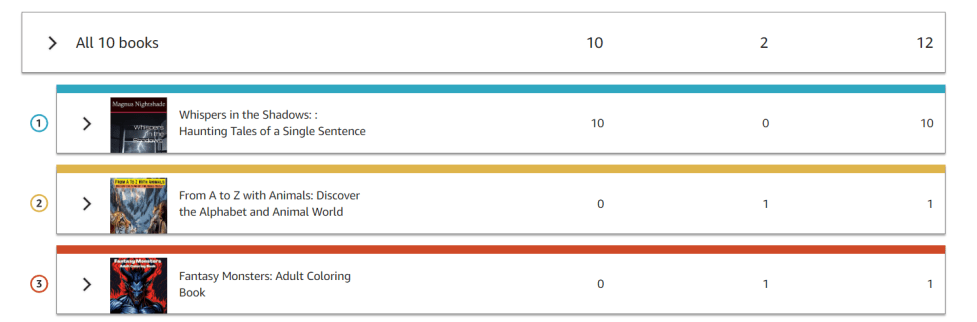
My ebook “Whispers in the Shadows” has had a total of 10 downloads. Which, I only charged .99 cents for. The other two books, alphabet one and the Fantasy Monsters are a bit higher costing book. Either way, you get this process down and then you will be able to start marketing your book. Which is the final step.
I will keep you updated about how sales go as I attempt to market a bit more through social media sites and potentially ads.
I hope this information helps get you started creating some kind of interesting stuff that you can publish the coming years through the platforms mentioned. If you feel I haven’t provided enough information, please let me know and I will edit the post to include it. This is a process. But, it is also a very easily done process if you can handle being patient through the whole thing to get a completed book. I definitely recommend that video, if you haven’t watched it already. It will guide you through the entire process of making a coloring book and adding to Amazon. Payhip.com is a very easily used website. And it is possible to publish images, as shown above.
Thanks for reading my content! I hope you have a wonderful day and learned something by reading it.
 Plot🫀Pulse | Short Stories & Blog
Leave a comment